Newest Pro Edition Innovation - BlueSky StatGPT (AI). Visit us at ACTS Milwaukee, April 20–23, ASQ Orlando, May 17-20, and JSM Boston, August 2-6


AI-GUIDED - A NEW WAY TO EXPERIENCE STATISTICS
BlueSky StatGPT: Your Personal Statistical AI Assistant
"The power of AI, at your fingertips - it's like having a world of statistics experts and PhDs sitting next to you — always ready to explain every number, every chart, every decision, every assumption, and guide you to the next steps — no matter your level of expertise."
Built directly into BlueSky Statistics, AI Assistant helps users understand statistical output, charts, diagnostics, assumptions, and next steps - all in the context of the analysis workflow. No copy-pasting into external chat applications. No context switching.
BlueSky StatGPT is an add-on module to the Pro Edition

Transform Statistical Analysis Into Interactive Expert Guidance
BlueSky Statistics now includes built-in integration with advanced AI Large Language Models (LLMs), bringing intelligent statistical interpretation and guidance directly into your analytics workflow.
With a single click, users can interact with built-in AI to understand every aspect of their statistical analysis — from tables, coefficients, and p-values to graphs, control charts, process capability, model quality, assumptions, interpretation, and recommended next steps.
Instead of searching documentation, consulting textbooks, or struggling to interpret complex statistical output, BlueSky Statistics users can now engage in natural-language conversations with AI directly inside the application. Ask follow-up questions. Dig deeper. The BlueSky AI Assistant understands your analysis and context. No copy-pasting into external chat applications. No context switching.
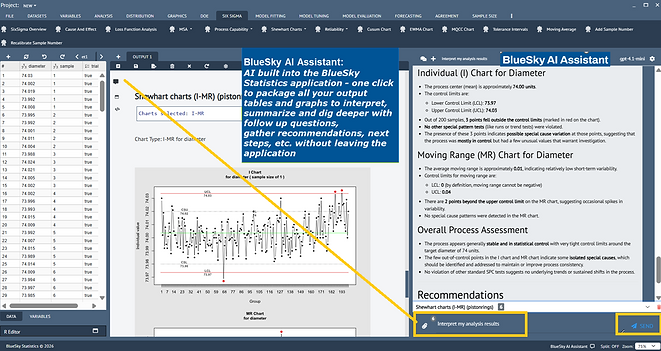

Your Personal Statistical AI Assistant
Imagine having a team of experienced statisticians, data scientists, and methodology experts sitting beside you while you work. BlueSky Statistics AI Assistant helps users:
-
Interpret statistical output in plain English
-
Explain every number in the analysis tables
-
Understand charts, diagnostics, and visualizations
-
Learn the meaning of p-values, confidence intervals, model fit, control charts, and process capability
-
Statistics and assumptions
-
Receive suggestions for the next analytical steps
-
Explore alternative methods and approaches
-
Continue interactive conversations about results
-
Learn statistics while performing real analysis
AI-Guided Interpretation Across Analyses
BlueSky AI assistant understands both the statistical results and the analytical context across multiple analyses, enabling meaningful and highly detailed conversations within complete analytical context:
-
Data summaries and exploratory analysis
-
Quality and process capability analysis
-
Regression models
-
DOE analyses
-
Survival and Reliability analysis
-
Hypothesis testing
-
Visualizations and graphs
-
And any and all statistical and data analyses


Keep every analytical conversation organized
BlueSky AI Assistant goes beyond one-off answers. Users can organize multiple analytical conversations into separate threads, each with its own user-defined title.
-
Create separate AI conversations for different analyses or topics with multiple analyses
-
Assign user-defined titles to conversation threads
-
Automatically save and restore conversations when BlueSky Statistics is relaunched
-
Keep or delete conversation threads, including associated analytical context, tables, and graphs
-
Export any or all conversations with full context to HTML or conversation file format to share and collaborate with other team members
Go Beyond Simple Summaries
This is far more than a simple “explain this result” feature.
BlueSky Statistics AI Assistant enables an interactive analytical experience where users can:
-
Ask follow-up questions
-
Request deeper explanations
-
Explore assumptions and limitations
-
Investigate anomalies or outliers
-
Ask for recommendations
-
Compare analytical approaches
-
Learn methodology concepts interactively
-
Generate narrative summaries and interpretations
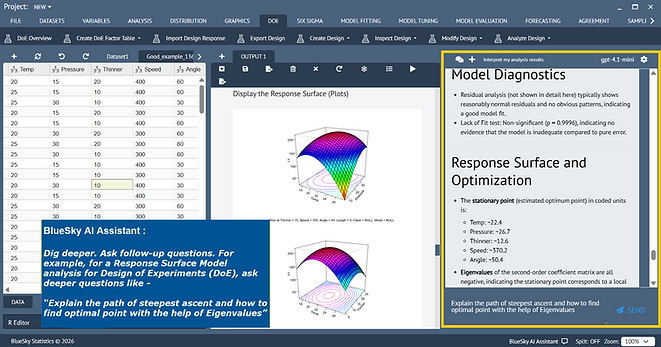

Example Questions You May Ask
Examples:
-
“What does this p-value mean?”
-
“Are my model assumptions satisfied?”
-
“Why is Supplier E significantly better?”
-
“Explain this interaction plot.”
-
“What should I analyze next?”
-
“How do I improve process capability?”
-
“Explain this regression coefficient.”
-
“What do these control chart violations mean?”
-
"How do I make sense of the survival/reliability plots?"
-
“How do I summarize this analysis for management?”
Seamless Integration Inside BlueSky Statistics
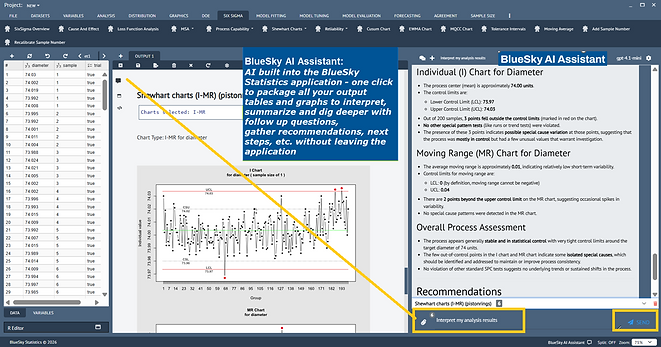
The AI integration is built directly into the BlueSky Statistics environment. AI that understands the full analytical context directly inside the statistical workflow.
Users can:
-
Launch AI conversations directly from analysis output
-
Continue analysis and interpretation without switching tools
-
Interactively explore statistical results in real time
-
Combine traditional statistical analysis with modern AI-guided interpretation
No complicated setup or external workflow is required.
.png)
Data Privacy and Security
BlueSky Statistics integrates with OpenAI APIs using secure encrypted communication.
Users and enterprises use their own OpenAI API credentials (API keys), giving them direct control over API usage, billing, account policies, and data governance.
Data security and privacy are governed through the users’ or enterprises’ own accounts with their selected AI/LLM providers. At no point do users’ data, analyses, or conversations pass through BlueSky Statistics' servers or cloud infrastructure. Data
submitted through OpenAI APIs is governed by OpenAI API platform policies and agreements established directly between OpenAI and the user or enterprise.
Designed for All Skill Levels
For Beginners
-
Learn statistics interactively
-
Understand terminology and concepts
-
Receive guided explanations
-
Build confidence interpreting results
For Advanced Users
-
Accelerate interpretation workflows
-
Explore deeper analytical insights
-
Validate conclusions
-
Investigate advanced statistical considerations
For Organizations and Teams
-
Improve accessibility of advanced analytics
-
Reduce interpretation bottlenecks
-
Enable broader self-service analytics
-
Support data-driven decision making
BlueSky Statistics AI Assistant – the built-in AI is different from generic chat tools
BlueSky StatGPT keeps the analysis and the conversation together, so users can stay focused on
interpretation and data driven decision-making.
Workflow Need
Generic AI Chat Tools
BlueSky StatGPT
Statistical context
User must manually copy/paste output and explain what it means.
One click - AI is launched (side-by-side) directly from BlueSky output and understands the analytical context.
Charts and diagnostics
Often disconnected from the tables, models, and workflow.
Users can ask questions about tables, graphs, diagnostics, assumptions, and model quality together across multiple analyses.
Follow-up questions
Conversation can lose context or require repeated setup.
Users can keep exploring results naturally inside the same analytical workflow.
Workflow efficiency
Requires switching tools and managing copied information manually.
No external workflow, no copy-paste friction, and no unnecessary context
switching - all built-in side-by-side.
Saved conversations
Often disconnected from the statistical project or analysis session.
Conversation threads can be organized, titled, saved, restored, kept, or deleted with their analytical context.